
Dynamics 365 Form Optimization: UX & Performance Tips
Many organizations, after launching their system, stick with default views that contain dozens of unused fields. This approach generates a high cognitive load for employees, as they must visually filter out redundant information during every interaction with a record. An overloaded interface is the primary reason sales representatives avoid data entry and prefer keeping notes in external text editors. When finding a phone number or payment status requires excessive scrolling, the system becomes a barrier rather than a support in daily operations. Optimization relies on the absolute reduction of distractions and tailoring column layouts to the visual physiology of users working on widescreen monitors.
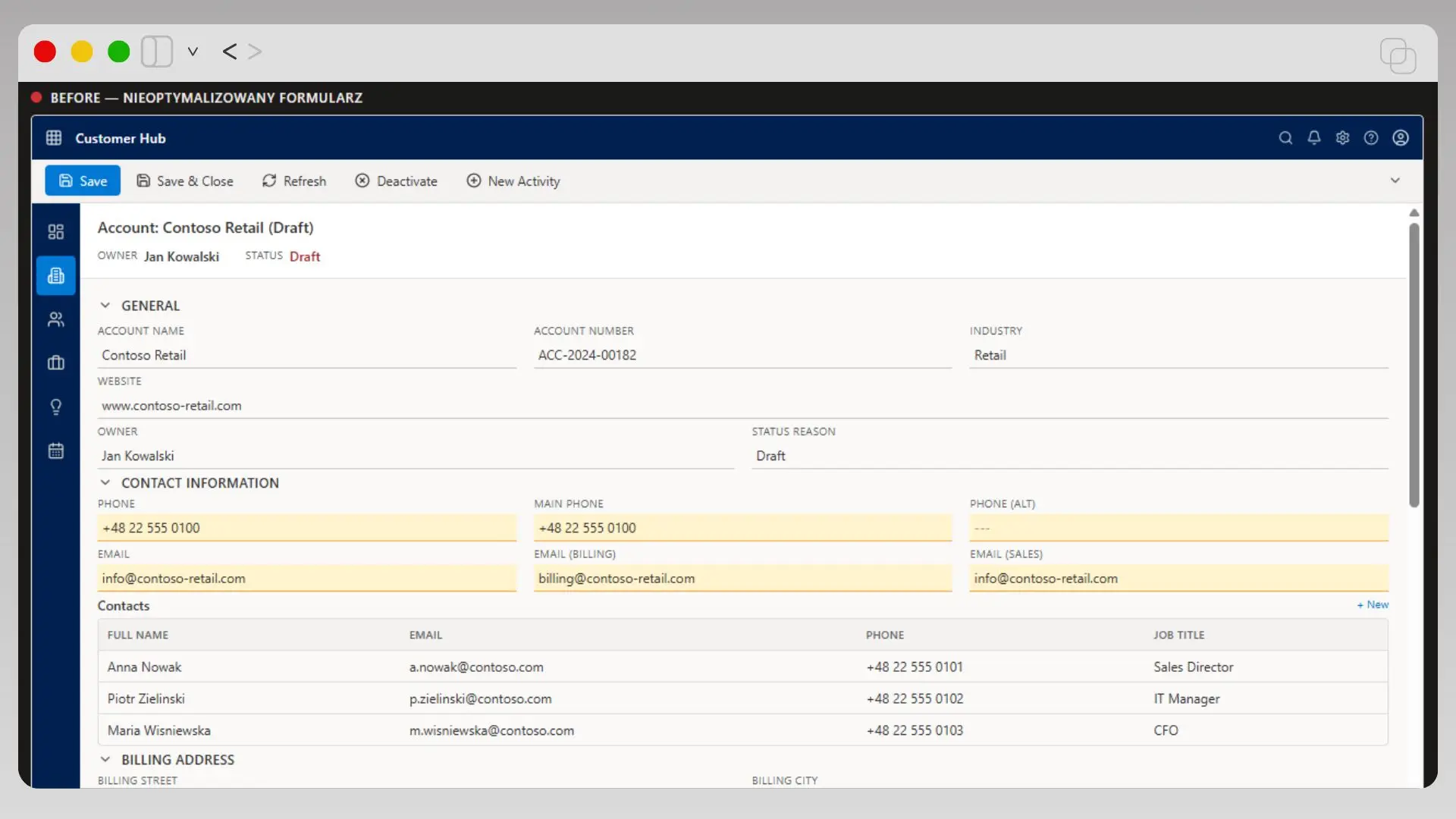 Fig 1: Example of a standard interface before view optimization.
Recommendation from ARP Ideas
Perform a field-fill audit in your database and remove all elements from the main form that have an annual fill rate lower than 20%.
Another issue is the lack of visual hierarchy. Default layouts often mix contact details with technical parameters or service history without clear section breaks. Users waste time orienting themselves within the document structure instead of performing substantive analysis of the client's case. A well-designed form should guide the eye from the general to the specific, utilizing headers and tabs for the logical segregation of business processes.
Section Architecture and High-Density Headers
Efficient view design in Microsoft Dynamics 365 requires moving away from the single long column model in favor of multi-column layouts and high-density headers. The form header is the most valuable workspace because it remains visible even while scrolling through the rest of the document. Placing key indicators there—such as current client status, record owner, or lead rating—allows for an instant situational assessment without moving the mouse. Using vertical dividers and clear labels in this section organizes the data structure and facilitates rapid visual scanning of critical business parameters.
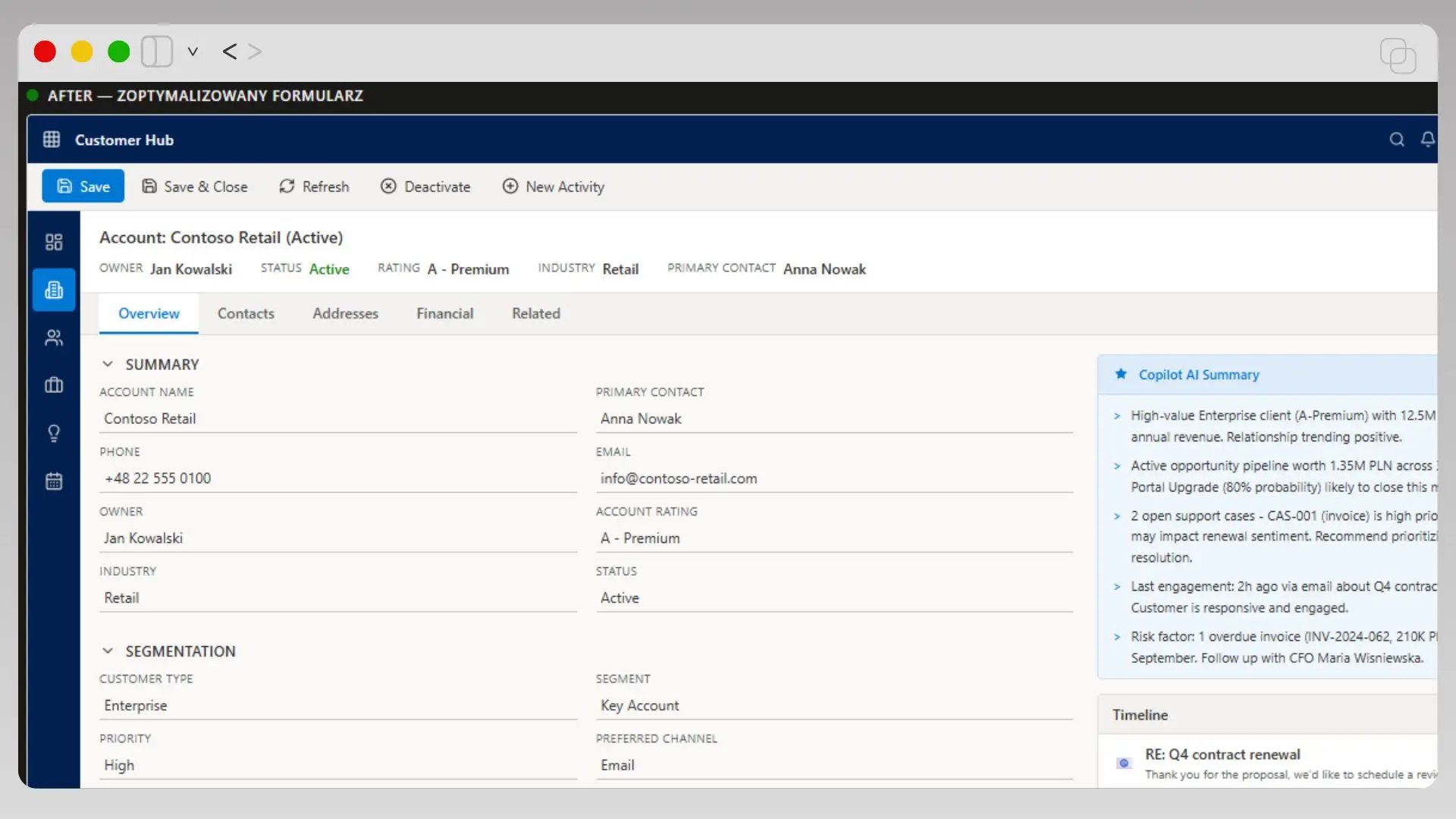 Fig 2: Optimized form – the use of tabs and AI side panels significantly improves data clarity.
A pivotal change in the UX approach is transforming the form from a passive list of fields into an active work tool. Instead of displaying full billing addresses on the main screen, it is beneficial to use collapsible sections or side panels. This technical solution maintains visual cleanliness while ensuring easy access to details when needed. Modern monitors offer significant horizontal space, which is best utilized through a three-column layout in the main section of the form. The left side should serve for editing core data, the center for the timeline, and the right for displaying contextual supporting information and related lists.
Recommendation from ARP Ideas
Configure the header in High Density mode to accommodate up to four key fields without restricting space for the main content of the client card.
Attention should also be paid to the color palette and typography of interface elements. Enforcing readability through bold labels and appropriate spacing between fields drastically reduces data entry errors. A well-prepared CRM system re-implementation accounts for specific user roles, offering different views of the same form for sales and administration departments. Personalizing views for specific tasks ensures that every employee sees exactly the information necessary to complete the current stage of the sales process.
Utilizing Microsoft Copilot AI for Relationship History Summaries and Data Automation
Traditionally, browsing the timeline for key client agreements is time-consuming and prone to oversight. Integrating AI modules directly into the Microsoft Dynamics 365 interface allows for the automatic generation of narrative summaries of the entire contact history. This mechanism analyzes emails, meeting notes, and status changes, presenting the user with a concise digest of the most important facts in a readable bulleted format. As a result, a salesperson preparing for a call does not need to open every record individually, as key risks and promises made to the client are visible immediately upon opening the record.
Modern AI widgets in the form can also identify connections that a human might overlook during routine work. For example, the system automatically identifies open high-priority service tickets or overdue invoices that could negatively impact sales negotiations. This information appears in a dedicated side panel, maintaining the cleanliness of the main data section while providing full business context. Such a technical solution changes the role of the CRM from a passive archive into an active source of operational insights.
Recommendation from ARP Ideas
Configure the Copilot summary to prioritize displaying recent activities and unresolved technical issues reported by the client.
Integrating intelligent summary features directly impacts data hygiene within the organization. Since the system can independently draw conclusions from correspondence, sales reps are more likely to sync their mailboxes with Microsoft Dynamics 365, seeing a real benefit in time savings. Eliminating the need to manually summarize every interaction allows the team to focus on substantive relationship management while technology ensures the consistency and availability of client knowledge across all departments.
Tabbed Architecture vs. Endless Scrolling
Designing an interface based on a single, long main page forces the user into a constant struggle with the scroll bar. This approach drastically lowers work comfort and causes vital information to get lost in a jungle of less important fields. Effective form optimization in Microsoft Dynamics 365 relies on introducing clear horizontal navigation via thematic tabs. Dividing data into tabs such as Summary, Financial Details, Addresses, or Relationships allows for an instant jump to the required context without scanning the entire record.
Using tabs also enables the logical organization of permissions and information availability for different roles. A customer service employee can default to a view focused on case history, while accounting opens the same record on a billing tab. Each tab should represent a complete substantive unit, which eliminates chaos and allows for faster orientation within the system. A proper navigation structure makes the interface predictable, and users know exactly where to find specific parameters without wandering across the screen.
Recommendation from ARP Ideas
Configure the form so that the primary Overview tab contains only 5-7 key fields and the timeline widget to maintain maximum clarity.
It is also worth considering the use of side panels for displaying auxiliary data that does not require a separate tab. A modern UX approach in CRM systems favors solutions that save screen space while providing full information depth. Thanks to tab-based architecture, the system becomes visually lighter and more intuitive, which directly translates to fewer errors resulting from haste or overlooked facts. Well-designed horizontal navigation is the foundation for efficiently navigating complex data structures within an organization.
Contextual Related Lists and Subgrid View Automation
Displaying all related records on a single client card is a simple way to create information chaos. In an optimized Microsoft Dynamics 365 form, tables with child data—such as sales opportunities or service cases—should be filtered contextually. Instead of presenting the full history from the last several years, it is worth configuring views to default to only active records or those from the last quarter. Limiting the number of rows in the direct preview makes the interface load faster, and users don't have to filter through hundreds of outdated entries to find current topics.
A modern approach to data architecture in forms promotes the use of Quick View components and subgrids integrated with business logic. These allow sales reps to see critical details about a related contact without having to navigate to a different part of the system. An additional convenience is the introduction of action buttons directly above lists, allowing for the rapid addition of a new activity or note without leaving the main workspace. Such navigational consistency eliminates unnecessary clicks and allows for full concentration on the task at hand.
Recommendation from ARP Ideas
Use editable grids for related lists to enable the editing of key fields directly within the table without opening each record individually.
A vital element of optimization is also automatic content suggestion based on the form's context. The system can display knowledge base articles or similar service cases based on keywords entered in the ticket title. This technical "tightening" of the interface ensures that less experienced employees gain access to proven customer service patterns without having to manually search archives. Contextual related lists then become a real substantive support, raising the quality of work for the entire team.
Summary: Task-Oriented Design
Effective form optimization in Microsoft Dynamics 365 is a process of continuous simplification and tailoring the tool to real operational needs. Moving from raw data lists to thoughtful, task-oriented views eliminates information fatigue and employee resistance to using the CRM. A clean and logical interface ensures that every minute spent in the system generates business value instead of frustration from searching through redundant sections. The foundation of success remains discipline in removing unused fields and the courage to implement modern solutions, such as AI-driven summaries.
Implementing these technical changes directly impacts the quality of the information gathered. When a form is intuitive and free of distractions, sales and service teams are more willing to ensure diligent record updates. A well-designed system then becomes the single source of truth about customers, allowing management to make decisions based on facts rather than estimates. Investing in interface ergonomics is, in reality, an investment in the stability of commercial processes and the long-term growth of the entire organization.
Free Consultation
Does your Dynamics 365 need a cleanup?
Schedule a 30-minute free consultation with our CRM systems architect. We will analyze your needs and identify the specific processes blocking your team's efficiency.
Actionable recommendations with no obligation
Book your consultation
Available slots this week